Pretendo Text Patches
By: Nathaniel & dewgong64
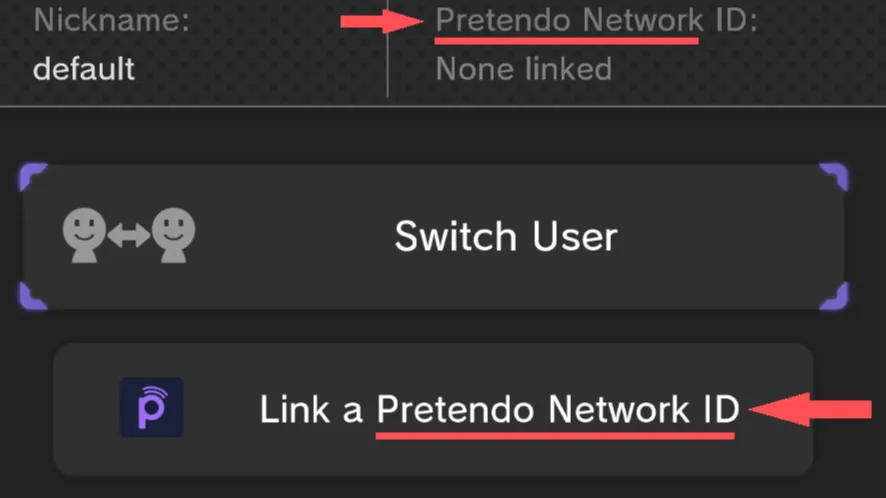
You can use these AllMessage BPS patch files to replace "Nintendo Network" instances with "Pretendo Network"
Text Patches in Japanese are not available, if you would like to contribute please contact @nathaniel_s7 or @gatto_ysh via discord
Installation
What you need
AllMessage.szsfor the language you want to modify.
Get your files
If you already have the AllMessage.szs file(s) you can skip this step.
You will need the AllMessage.szs file for the language you want to edit, if you do not have this file you can obtain it using any of the methods from Menu Files and get the file from the following location.
content > [LANGUAGE] > Message > AllMessage.szs.- In
[LANGUAGE]use the language you want to edit.- For example:
UsEnglish.
- For example:
- In
storage_mlc > sys > title > 00050010 > [REGION] > content > [LANGUAGE] > Message > AllMessage.szs.- Depending on the region of your console, in
[REGION]use10040100for USA.10040200for EUR.10040000for JPN.
- In
[LANGUAGE]use the language you want to edit.- For example:
UsEnglish.
- For example:
- Depending on the region of your console, in
Patching
Go to Patching or Rompatcher.js and patch your original AllMessage.szs with the patch you downloaded previously
- Select your original
AllMessage.szsfile of the language you want to modify.- For example:
UsEnglish.
- For example:
- Select the
AllMessage.bpsfile of the same language used in the previous step. - Click Apply Patch.
Loading Custom Text
You can load the text using either StyleMiiU-Plugin or SDCafiine.
-
Place the patched
AllMessage.szsfile(s) in the following locationSD:/wiiu/themes/[ThemeName]/content/[LANGUAGE]/Message/AllMessage.szs
-
In
[ThemeName]use the theme where you want to modify the text. - In
[LANGUAGE]use the language you want to edit.- For example:
UsEnglish.
- For example:
-
Place the patched
AllMessage.szsfile(s) in the following locationSD:/wiiu/sdcafiine/[TITLEID]/[ThemeName]/content/[LANGUAGE]/Message/AllMessage.szs
-
Replace
[TITLEID]with the title ID of your region.- USA:
0005001010040100 - EUR:
0005001010040200 - JPN:
0005001010040000
- USA:
-
In
[ThemeName]with the theme where you want to modify the text. - In
[LANGUAGE]with the language you want to edit.- For example:
UsEnglish
- For example:
Text that says Nintendo should be replaced with Pretendo!