Menu Files
First, we need to obtain the menu files, there are several ways to do it:
If you have previously modified the Wii U Menu files from your nand, your only option is JNUSTool.
Retrieving Menu Files Through Themiify
What you need
Guide
- Open Themiify.
- Go to Settings.
- Select "Dump Wii U Menu Files"
-
Confirm.
- Your Wii U Menu Files have been dumped to
SD:/themiify/cache/
- Your Wii U Menu Files have been dumped to
-
Turn off your Wii U and insert your SD Card on your computer.
- Go to
SD:/themiify/cache/Common/Package/and copyMen.packandMen2.pack. - Go to
SD:/themiify/cache/Common/Sound/Men/and copycafe_barista_men.bfsar. - (Optional) Go to
SD:/themiify/cache/[LANGUAGE]/Message/and copyAllMessage.szs.- In
[LANGUAGE]use the language you want to dump.- For example:
UsEnglish.
- For example:
- In
Retrieving Menu Files Through FTP
What you need
Now depending on your operative system select a FTP client:
- Windows: WinSCP.
- MacOS: Cyberduck.
- Linux: Nautilus or Dolphin, the file explorers for GNOME and KDE respectively .
- if not usable, use gFTP instead.
- Android: File Manager.
Guide
- Turn on your console without any custom theme. (This will cause issues when getting the files we need.)
- Open the WUPS Menu (L + ↓ + SELECT) and search for FTPiiU Plugin.
- Press Settings and enable everything.
- On your PC open the FTP client.
- It will ask for your Console IP and Port Number you can see these details on your console. This is a local IP address, so it doesn't matter.
- It will ask for a user and a password, leave it blank, just accept.
-
Now navigate to the Wii U Menu Folder, depending on the console region:
- USA:
storage_mlc/sys/title/00050010/10040100/content/Common/Package - EUR:
storage_mlc/sys/title/00050010/10040200/content/Common/Package - JPN:
storage_mlc/sys/title/00050010/10040000/content/Common/Package
- USA:
-
Select
Men.packandMen2.pack, then click Download. - It will ask for a place to download the files, it's recommended to create a specific folder to save the content.
- Go back and then navigate to
Sound/Men. - Download
cafe_barista_men.bfsar. -
(Optional) Dump
AllMessage.szs-
Go back and navigate to
content/[LANGUAGE]/Message/AllMessage.szs.- In
[LANGUAGE]use the language you want to dump.- For example:
UsEnglish.
- For example:
- In
-
Download
AllMessage.szs
-
Credits to wiki.hacks.guide for the information in this section.
Using JNUSTool to Download Menu Files
This is useful in case you lost your original Wii U menu files.
What you need
- otp.bin.
- It's already in your sd card if you're using aroma.
SD:\wiiu\backups\SERIAL_NUMBER\otp.bin.
- JNUSTool.
Getting the Wii U Common Key
Setting up JNUSTool
Open the JNUSTool folder and open the file config, then replace [COMMON KEY] with the Common Key from the previous step.
http://ccs.cdn.wup.shop.nintendo.net/ccs/download
[COMMONKEY]
updatetitles.csv
https://tagaya.wup.shop.nintendo.net/tagaya/versionlist/EUR/EU/latest_version
https://tagaya-wup.cdn.nintendo.net/tagaya/versionlist/EUR/EU/list/%d.versionlist
Running command
Make a command.bat file inside the JNUSTool folder and paste this
Run the command and type the region ID.
- USA:
0005001010040100 - EUR:
0005001010040200 - JPN:
0005001010040000
Downloading files
Go to root/content/Common/Package and download Men.pack and Men2.pack.
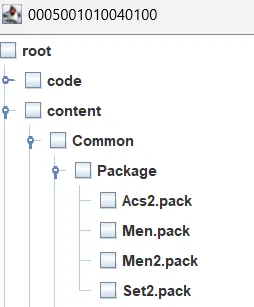
Go to root/content/Common/Sound/Men and download cafe_barista_men.bfsar.
(Optional) Dump AllMessage.szs
Go to root/content/[LANGUAGE]/Message/ and download AllMessage.szs.
content > [LANGUAGE] > Message > AllMessage.szs.- In
[LANGUAGE]use the language you want to dump.- For example:
UsEnglish.
- For example:
- In